Channels
Channels are one of the central concepts in GONet Wizard. A GONet camera uses a Bayer color filter array, so each raw sensor pixel measures light through one color filter. The raw image is therefore not stored as three fully sampled color images. It is stored as a mosaic of red, green, and blue filtered pixels.
GONet Wizard exposes those measurements as channel arrays.
Bayer pattern
The GONet raw data use a BGGR Bayer pattern. In a Bayer mosaic, neighboring pixels sample different color filters. A simplified 2x2 Bayer tile looks like this:
B G
G R
The pattern repeats across the sensor. This means that red, blue, and the two green positions are sampled at different pixel locations.
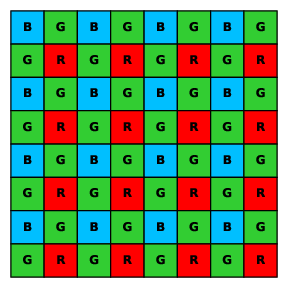
BGGR Bayer mosaic used by the GONet image sensor.
Red, green, and blue channels
GONet Wizard commonly works with these channel names:
redPixels sampled through the red filter positions in the Bayer mosaic.
greenA combined green channel, used by file representations that expose a single green plane.
green1andgreen2The two distinct green positions in the Bayer tile. Raw Bayer data contain two green samples per 2x2 tile, and
GONetFileRawcan preserve them as separate arrays.
bluePixels sampled through the blue filter positions in the Bayer mosaic.
Why there are two green channels
A Bayer tile contains two green pixels because the human visual system is most sensitive to luminance, and green filters contribute strongly to luminance information. For GONet Wizard, this means that a raw Bayer representation can preserve two separate green planes.
Some workflows combine the two green samples into one green channel for
simplicity. Other workflows keep green1 and green2 separate so that no
Bayer-position information is lost.
Full-array representation
A channel plane is smaller than the full sensor array because it contains only pixels from one color-filter position. In some workflows, GONet Wizard can build a full-array representation by placing channel values back into their original Bayer locations.
This is useful when a downstream task needs an image-shaped array that preserves the original sensor geometry. It is different from creating an RGB image: the full array is still a sensor-value product, not a display image.