The GONetFile Object
GONetFile is the main in-memory representation used by GONet Wizard. It is
the bridge between the physical image file on disk and the tools that inspect,
plot, transform, or extract measurements from that image.
This page explains the concept. The full API details are documented in the API Reference.
Why GONetFile exists
A GONet image file can contain several kinds of information:
image data;
raw Bayer data;
channel arrays;
metadata;
file-format information.
Rather than passing these pieces around separately, GONet Wizard loads them into
a structured object. This gives the rest of the package a consistent way to ask
for channels, metadata, filenames, and output representations, including the
standard TIFF and JPEG products written by the split_raw command.
Conceptual structure
A GONetFile stores:
filenameThe source filename associated with the image.
filetypeThe interpreted file type. The raw comes with a
.jpgextension, but some GONet files were previously converted to TIFF. The file type is determined by the file extension and internal content.metaMetadata extracted from the image and related sources. Note that metadata are not available for TIFF files.
channelsChannel arrays such as
red,green, andblue.
The exact channel layout depends on which object is used. The standard
GONetFile representation
uses a single green channel, while
GONetFileRaw can
preserve green1 and green2 separately.
GONetFile and GONetFileRaw
The two primary file-model classes serve related but distinct purposes:
GONetFileA general-purpose representation of a GONet image with standard channel access and metadata handling.
GONetFileRawA raw-oriented representation that can expose separate Bayer planes, including
green1andgreen2.
Most users do not need to instantiate these classes directly. They are created by the package when files are loaded through commands, GUI workflows, or helper functions.
Byte Parsing
In a GONet image, each pixel is encoded with 12 bits, and every group of two pixels is packed into 3 consecutive bytes. The format is as follows:
Byte 0: lower 8 bits of Pixel 0
Byte 1: lower 8 bits of Pixel 1
Byte 2: upper 4 bits of both Pixel 0 and Pixel 1, packed as two nibbles
This packaging is commonly known as a 12-bit packed little endian format. The following diagram shows how 3 bytes form 2 pixel values:
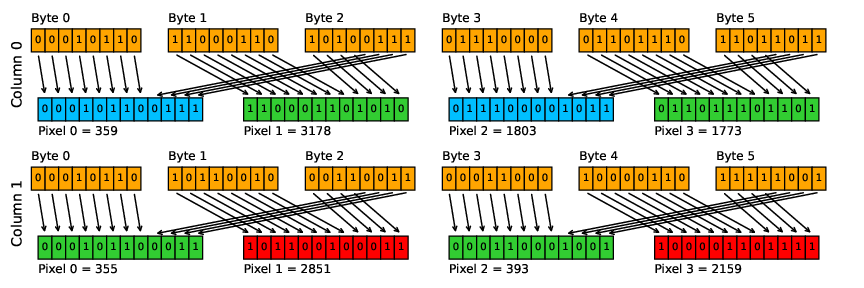
Packing of 12-bit pixel values into 8-bit bytes.
In GONetFile._parse_jpg_file() raw files are read in binary mode.
In order to reconstruct the original pixels values from the bytes,
the following procedures are executed. Let’s assume the bytes are listed
in a bytes_array numpy.array
To recreate the first pixel, the first element of every block of 3 elements of
bytes_arrayis left shifted by 4 bits (using the operator<<). The third element of every block of 3 elements is then cut to the first 4 less significant bits (done by using an&operator with the number 15, which is 1111). These 2 new numbers are then summed.byte0 = b'00010110' byte0_left_shifted = byte0 << 4 # -> 000101100000 byte2 = b'10100111' byte2_cut = byte2 & 15 # -> 0111 pixel0 = byte0_left_shifted + byte2_cut # -> 000101100111
To recreate the second pixel, the second element of every block of 3 elements of
bytes_arrayis left shifted by 4 bits. The third element of every block of 3 elements is then right shifted by 4 bits (using the operator>>). These 2 new numbers are then summed.byte0 = b'11000110' byte0_left_shifted = byte0 << 4 # -> 110001100000 byte2_right_shifted = byte2 >> 4 # -> 1010 pixel1 = byte0_left_shifted + byte2_right_shifted # -> 110001101010
Each recreated pixel is then stored in each channel following the Bayer pattern.
Relationship to commands and the GUI
Both the CLI and the GUI ultimately operate on GONet file objects. For example,
when the user asks GONet Wizard to show an image, inspect metadata, extract
measurements, or split a RAW .jpg into standard image products, the input
file is first normalized into one of these internal representations.
This design is one of the reasons the GUI and CLI can share the same processing engine: they both work with the same internal model of a GONet image.